
Building Mobile Apps That Connect With Business Systems, APIs, and Payments
· ~8 minutes · Faiz Khan
Modern business mobile apps often need to do much more than display information. They need to connect with business systems, APIs, payment services, notifications, documents, and other workflows to give customers a complete digital experience.
Faiz Khan
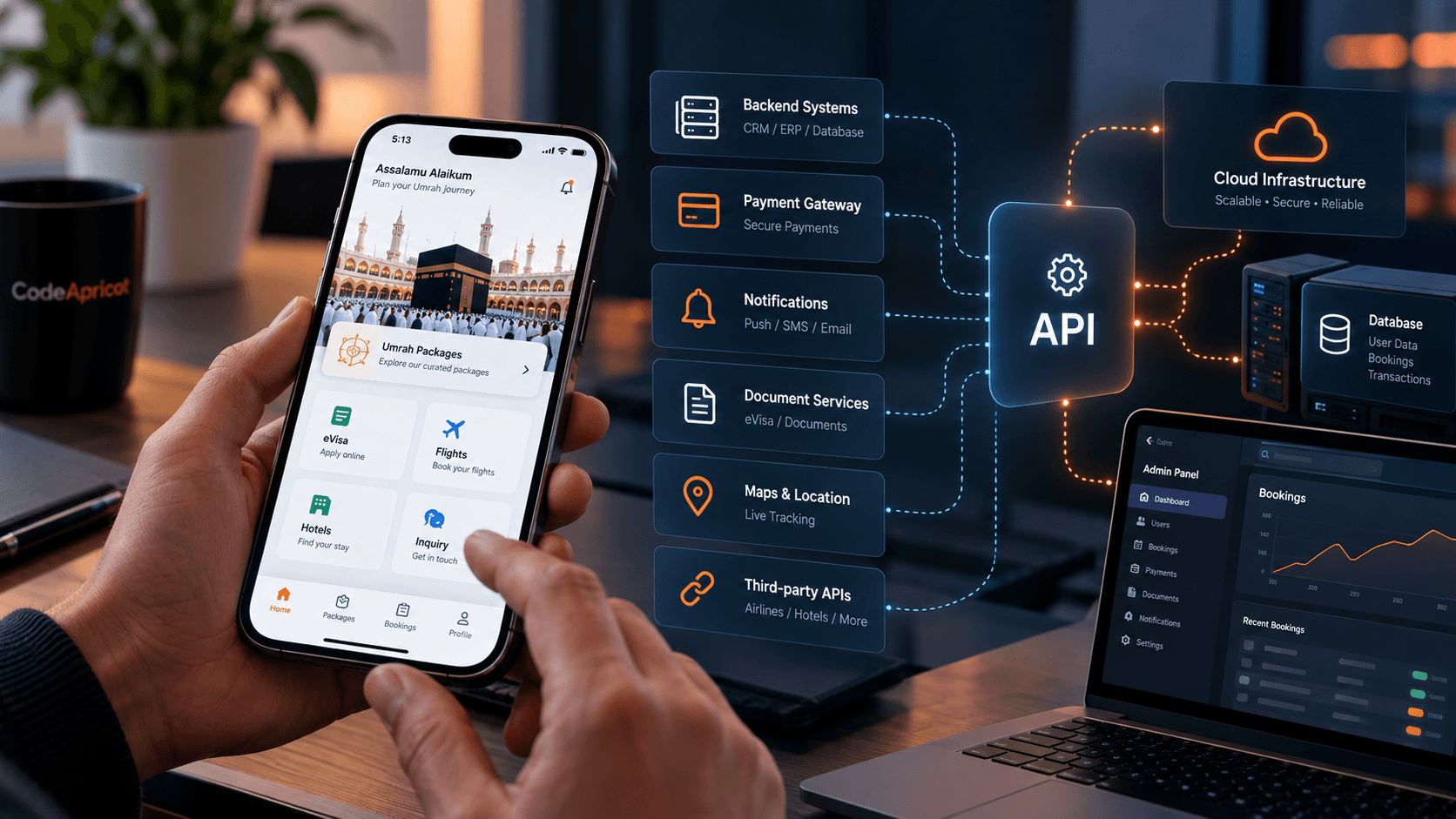
Building Mobile Apps That Connect With Business Systems, APIs, and Payments
A mobile application can look polished and still fall short if it operates in isolation.
For many businesses, the real value of a mobile application comes from what happens behind the screens. A customer may browse a service, create an account, submit information, upload documents, make a payment, and receive status updates—all from the same application. For that experience to work reliably, the mobile application needs to communicate with the systems and services that support the business.
That can include backend APIs, authentication systems, payment providers, notification services, document storage, analytics, and other third-party platforms.
Building this kind of application therefore involves more than designing screens. The mobile experience and the underlying business workflow need to be considered together.
What Does a Connected Mobile Application Mean?
A connected mobile application is one that communicates with external systems to perform real business operations.
Instead of keeping everything inside the application itself, the mobile app acts as an interface through which customers interact with the business.
For example, a customer might:
- Create an account and sign in
- Browse available services
- Submit an application
- Upload supporting documents
- Make a payment
- Receive notifications
- Check the status of a request
- Respond to additional requirements
- Access information provided by the business
The mobile application provides the user experience, while backend systems and integrations handle the underlying data and processes.
This distinction is important because many business applications are essentially the front end of a much larger system.
Connecting the App to Business Systems and APIs
One of the most important parts of a connected mobile application is communication with the backend.
Mobile applications commonly communicate with backend services through APIs. The API provides a structured way for the application to request information, submit data, update records, and retrieve the latest status.
For example, when a customer submits an application through a mobile app, the app may send that information to a backend API. The backend can then process the request and return the application's current status to the mobile application.
This allows the application to remain focused on the customer experience while the backend manages business data and operations.
The same approach can support different parts of a workflow, including:
- User accounts and authentication
- Customer profiles
- Applications and requests
- Service information
- Document records
- Application statuses
- Notifications
- Transaction information
The exact architecture depends on the business and the systems already in place.
Authentication and Customer Accounts
A connected application also needs a reliable way to identify users.
Authentication allows customers to securely access their own information rather than treating the application as a simple public information portal.
Depending on the requirements, an application may need to support account creation, login, password recovery, session management, and other account-related functionality.
Once a customer is authenticated, the application can retrieve information associated with that account through the backend.
This becomes particularly important when an application handles ongoing processes. A customer may start an application today and return later to upload another document, complete a payment, or check the latest status.
The application needs to provide continuity across those interactions.
Integrating Payments Into the Mobile Experience
Payments are another area where mobile applications often need external integrations.
A business may already use a payment provider, or it may need to support multiple payment methods depending on its customers and operational requirements.
The mobile application can provide the interface through which the customer starts the payment process, while the payment service handles the transaction itself.
The important consideration is that payment should not be treated as an isolated screen.
It is usually part of a larger business workflow.
For example:
Service selection → Application → Required information → Documents → Payment → Application status
The application needs to communicate the appropriate state to the customer at each stage.
If a payment is completed, the application may need to reflect that change. If additional action is required, the customer should be able to understand what needs to happen next.
The technical implementation will vary depending on the payment provider and business requirements, but the customer experience should remain clear throughout the process.
Documents Can Become Part of the Application Workflow
Some business applications require customers to submit documents rather than simply enter text.
This introduces another layer of functionality.
The application may need to allow customers to:
- Select or capture documents
- Upload files
- View previously submitted documents
- Replace documents when necessary
- Respond to requests for additional documentation
- Understand whether a document has been received or verified
Document workflows are particularly important for applications involving approvals, registrations, applications, compliance, or service requests.
Instead of relying on separate communication channels for every document exchange, the mobile application can bring the process into one structured workflow.
Notifications Keep Customers Informed
A connected application can also use notifications to keep customers informed when something changes.
For an application-based business process, customers may need to know when:
- Their application has been received
- A document requires attention
- Their application status changes
- A payment-related action is required
- New information becomes available
Push notifications can bring the customer's attention to these changes without requiring them to repeatedly open the application to check for updates.
However, notifications work best when they are connected to meaningful business events rather than being used simply because the application supports push notifications.
The Integration Should Influence the UX
One common mistake is to design the entire mobile interface first and think about integrations later.
For connected business applications, the underlying workflow should influence the user experience from the beginning.
Consider a customer who needs to submit an application with several documents and then complete a payment.
The interface needs to make clear:
- What information is required
- Which documents have been submitted
- What is still missing
- Whether the application has been submitted
- Whether payment has been completed
- What happens next
The API and backend architecture may determine what information is available, while the UX determines how that information is presented to the customer.
Both need to work together.
A Real Example: An Umrah Visa Services Application
A recent CodeApricot project illustrates how these integrations can come together in a real business workflow.
For an Umrah visa services provider, CodeApricot developed a cross-platform mobile application designed to move the visa application process from predominantly manual communication into a centralized digital experience.
For an Umrah visa services provider, CodeApricot developed a cross-platform mobile application designed to move the visa application process from predominantly manual communication into a centralized digital experience.
Behind that experience, the application connects to a REST API for application and document management.
The project also incorporated Firebase for notifications, analytics, and crash reporting.
For payments, the application supports Stripe-hosted checkout as well as Zelle and cheque payment workflows.
The result is not simply a collection of mobile screens. The application brings service discovery, applicant information, document submission, payment, notifications, and application tracking into a connected workflow.
You can see the project in more detail in our Umrah Visa Services App case study.
Text: Umrah Visa Services App case study
URL: /portfolio/umrah-visa-services-app
What Should Businesses Consider Before Building a Connected App?
Before development begins, it is useful to understand the systems and workflows the application will need to interact with.
What Already Exists?
Does the business already have a backend, API, database, payment provider, CRM, or other system that the application needs to use?
Understanding the existing technology can significantly influence the architecture of the mobile application.
What Should Customers Be Able to Do?
The application should be defined around actual customer and business workflows rather than simply a list of screens.
For example, "upload documents" is a feature. "Submit an application, upload required documents, receive requests for missing documents, and track verification" describes a workflow.
The latter provides much more useful direction for development.
Which Third-Party Services Are Required?
Payments, maps, notifications, analytics, authentication, communications, and other services may all require integrations.
Identifying them early helps avoid architectural surprises later in development.
What Happens When Something Goes Wrong?
A connected application needs to account for failed payments, interrupted uploads, unavailable APIs, expired sessions, network problems, and other unexpected situations.
A reliable experience is not one where errors never happen. It is one where the application handles them clearly and gives the customer an appropriate next step.
How Will the System Evolve?
Business requirements change.
The application may eventually need another payment provider, a new workflow, additional services, or connections to another business system.
Building with future changes in mind can make the product easier to extend without unnecessarily rebuilding the entire application.
When Does a Connected Mobile App Make Sense?
Not every business needs a complex mobile application.
A connected mobile experience becomes more relevant when customers need to repeatedly interact with a business process from their phones.
This can include:
- Customer portals
- Booking and service applications
- E-commerce experiences
- Membership platforms
- Field-service applications
- Application and approval workflows
- Document-based services
- SaaS products with mobile experiences
- Businesses with existing backend systems that need a mobile interface
The right approach depends on what the business is trying to accomplish and which systems already exist.
Building the Mobile Experience Around the Business
The most important part of a connected mobile application is not the number of integrations.
It is how those integrations work together to support a useful business process.
A successful application should make the customer's journey easier while giving the business a structured way to manage the information and operations behind that journey.
That means considering the mobile interface, backend systems, APIs, payments, documents, notifications, security, and future requirements as parts of the same product rather than completely separate pieces.
At CodeApricot, we approach mobile application development around that broader workflow—understanding what the business needs the application to accomplish, then building the technology around it.
Ready to Build a Connected Mobile Application?
Interested in building a mobile application around your existing business systems?
Text: Explore our Mobile Applications solutions
URL: /solutions/mobile-applications
Text: Start a project with CodeApricot
URL: /contact
Stay Updated
Receive practical insights, engineering perspectives, and business-focused technology articles delivered as new content becomes available.
Looking For Guidance On Your Next Project?
Whether you're exploring new technology, planning a digital product, or solving a business challenge, we'd be happy to discuss your goals and help you identify the right approach.