Web Application vs Website: How to Tell Which One Your Business Actually Needs
· 7 min · Faiz Khan
Not every business needs a complex web application. Understanding the difference between a website and a web application can help you choose the right technology for your business goals, customer experience, and operational needs.
Faiz Khan
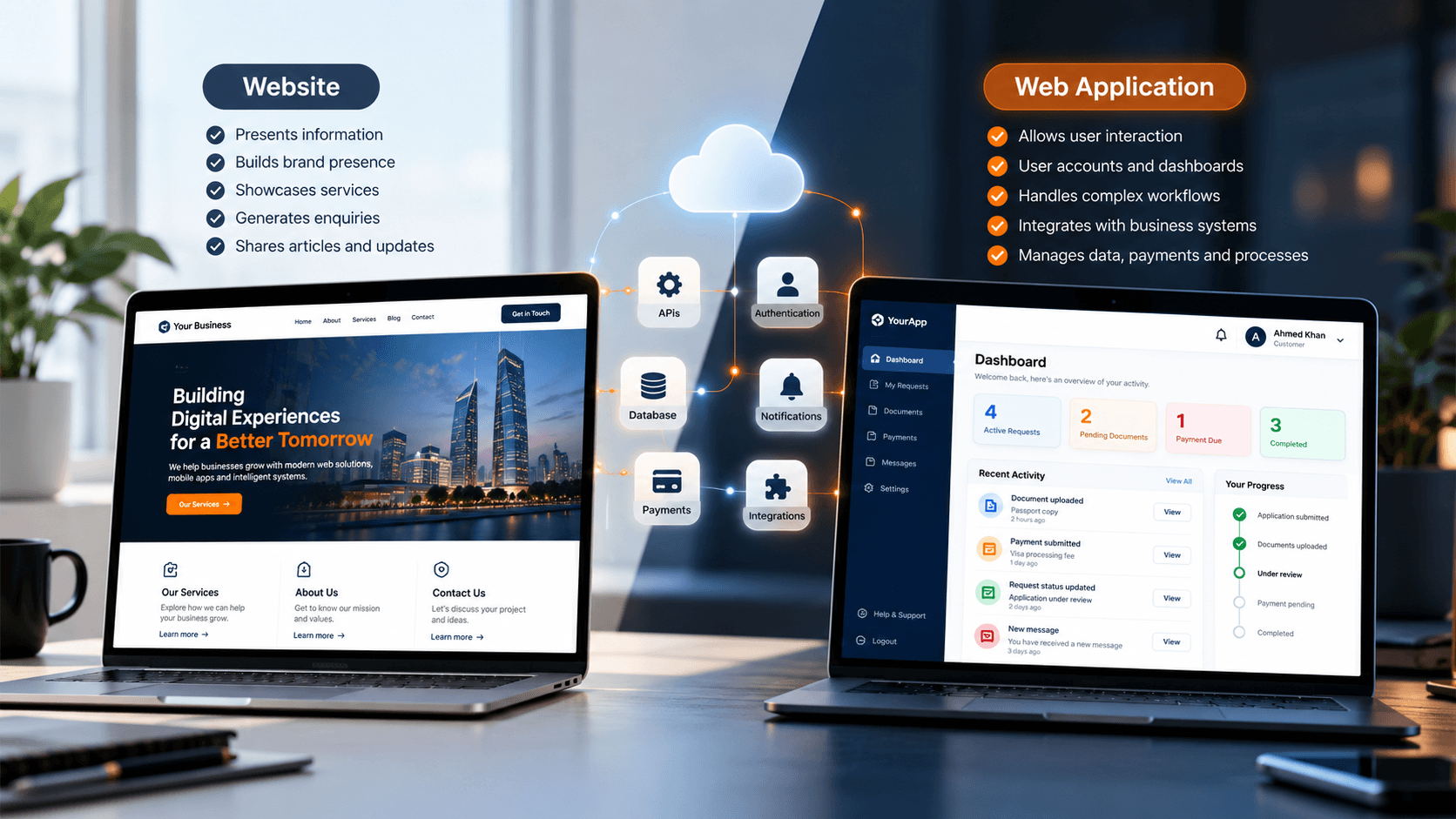
Businesses often use the words “website” and “web application” interchangeably. In practice, they can serve very different purposes.
A website may primarily help people discover a business, understand its services, read information, and get in touch. A web application can go much further by allowing users to log in, submit information, manage data, make payments, track processes, or interact with business systems.
Understanding the difference is important because choosing the right approach should start with what the business and its customers actually need to accomplish—not simply with the technology itself.
What Is a Website?
A website is primarily designed to present information to visitors. It can help a business establish its online presence, explain what it offers, publish useful content, and give potential customers a way to get in touch.
A typical business website might include:
- About the business
- Services or solutions
- Product information
- Contact information
- Blog or insights
- Frequently asked questions
- Company information and resources
Visitors generally move through the available pages to find information and decide what they want to do next.
This does not mean a website cannot include interactive features. Contact forms, search, booking forms, payments, and other functionality can all exist on a website. The important question is how central those interactions are to the overall business process.
What Is a Web Application?
A web application is designed around interaction. Instead of simply presenting information, it allows users to perform actions and interact with business systems through a web browser.
A web application might allow a customer to:
- Create an account and sign in
- Manage their profile
- Submit an application or request
- Upload documents
- Make payments
- Track orders or requests
- View personalized information
- Communicate with a business
- Manage ongoing activities
Behind the interface, a web application commonly communicates with backend services, databases, APIs, authentication systems, and third-party platforms.
This makes the web application part of a larger business workflow rather than simply a collection of informational pages.
The Main Difference: Information vs Interaction
The simplest way to think about the difference is to look at what the user needs to accomplish.
When a Website Is Enough
A website may be appropriate when the primary goal is to present information and help visitors understand the business.
For example, a business may mainly need to:
- Explain its services
- Showcase products or work
- Publish articles and resources
- Generate enquiries
- Provide contact information
- Build credibility online
In these situations, the website is primarily helping visitors discover information and decide what to do next.
When You Need a Web Application
A web application becomes more relevant when users need to repeatedly interact with the business through the browser.
For example, customers may need to:
- Log into their accounts
- Submit applications
- Upload documents
- Make payments
- Track requests
- Manage bookings
- View personalized information
- Complete multi-step workflows
In these cases, the website is no longer just presenting information. The digital experience is becoming part of the business operation itself.
What Does Your Business Actually Need?
Before deciding whether to build a website or a web application, it is useful to start with the customer journey and business workflow.
What Should Your Customers Be Able to Do?
Think about actions rather than pages.
“Contact us” is a website requirement.
“Create an account, submit an application, upload required documents, receive requests for additional information, and track the application status” describes a complete workflow.
The second type of requirement usually points toward a more interactive web application.
Does the System Need User Accounts?
User accounts can significantly change the nature of a digital product.
If customers need to access their own information, manage ongoing activities, or see a personalized dashboard, the system may need authentication and account management.
The same can apply to internal users. Staff members may need different permissions, dashboards, or access to specific business information.
Does It Need to Connect to Other Systems?
A business may already use systems that the new digital experience needs to communicate with.
These can include:
- Backend APIs
- Databases
- CRM systems
- Payment providers
- Authentication services
- Notification platforms
- Internal business systems
- Other third-party services
Understanding these integrations early can influence the architecture of the entire project.
Does the Business Need Ongoing Workflows?
Some businesses need customers or staff to move through structured processes rather than simply read information.
Examples include:
- Booking
- Applications
- Approvals
- Orders
- Payments
- Document processing
- Customer support
- Business operations
When these workflows become central to the product, a web application can provide a more suitable environment for managing them.
Website vs Web Application: A Practical Comparison
There is no universal rule that one approach should replace the other. The right choice depends on what the business needs the digital experience to accomplish.
Requirement | Website | Web Application |
|---|---|---|
Business information | Common | Possible |
Marketing content | Common | Possible |
Contact forms | Common | Common |
User accounts | Sometimes | Common |
Personalized dashboards | Limited | Common |
Complex workflows | Limited | Common |
Business system integration | Sometimes | Common |
Payments | Possible | Common |
Customer-specific data | Limited | Common |
Ongoing user interaction | Limited | Common |
The table is a starting point rather than a strict technical rule. A modern website can include significant functionality, while a web application can also contain informational and marketing content.
Can a Website and Web Application Exist Together?
Choosing between a website and a web application does not always mean choosing only one.
A business can have a public-facing website alongside customer and internal application experiences.
For example:
- Marketing website
- Customer portal
- Internal dashboard
- Backend services
- Business databases
- Third-party integrations
These components can work together as parts of a broader digital platform.
A visitor might first discover the business through the website, become a customer, create an account, and then use a web application to manage their relationship with the business.
This approach can be useful when a business needs both a strong public presence and deeper digital workflows.
What Technology Does a Web Application Need?
The technology behind a web application depends on the requirements, but most applications involve several connected components.
These can include:
- Frontend application
- Backend services
- Database
- APIs
- Authentication
- Hosting and infrastructure
- Third-party integrations
- Security controls
- Monitoring and maintenance
The frontend is responsible for the user experience, while backend systems handle business logic, data, and communication with other services.
The architecture should be designed around the actual workflow rather than adding technology simply because it is available.
For a smaller application, the architecture may be relatively straightforward. A larger platform may require multiple services, integrations, user roles, data models, and operational systems.
A Simple Example
Consider a service business that wants to improve how customers interact with it.
Its public website might provide:
- Services
- About the company
- Frequently asked questions
- Contact information
- Articles and resources
A customer-facing web application could then allow customers to:
- Create an account
- Submit a request
- Upload documents
- Make a payment
- Track the request
- Receive updates
The website helps customers discover and understand the business, while the web application helps them interact with the business.
Both experiences can be connected to the same underlying systems.
What Should You Consider Before Building?
Your Business Goal
Start by defining what the digital product needs to achieve for the business.
Is the main goal to generate enquiries, provide information, sell products, manage customers, automate a workflow, or deliver an ongoing digital service?
Your Customer Journey
Map out what customers need to do from their first interaction through to the completion of the process.
This can reveal whether the requirement is primarily informational or whether customers need a more interactive experience.
Existing Systems
If the business already has a backend, database, CRM, payment provider, or other software, the new experience may need to connect to those systems.
Understanding the existing technology before development begins can help avoid unnecessary duplication and architectural problems later.
Future Requirements
Business requirements can change as the product grows.
A system that begins with a simple customer form may eventually need accounts, dashboards, payments, notifications, reporting, or integrations with other systems.
Thinking about likely future requirements can help create a foundation that can evolve without unnecessarily rebuilding the entire product.
Budget and Complexity
A more interactive product generally requires more development, infrastructure, testing, security considerations, and ongoing maintenance.
The goal should not be to build the most technically complex solution. It should be to build the level of functionality that genuinely supports the business requirement.
When Should You Choose a Web Application?
A web application may make sense when customers or staff need to repeatedly interact with a business process through a browser.
Common signals include:
- Customers need accounts
- Users need personalized information
- Customers need to submit or manage data
- Processes need to be tracked
- Payments are part of the workflow
- Documents need to be uploaded or managed
- Multiple systems need to communicate
- Staff need operational dashboards
- The product itself is delivered through the browser
The presence of one of these requirements does not automatically mean a web application is necessary. The important question is how central these interactions are to the overall business process.
Building the Right Web Experience for Your Business
The decision between a website and a web application should begin with the business rather than the technology.
Start with:
Business → Users → Workflow → Technology
Understanding the business objective helps define what users need to accomplish. Those workflows then determine the functionality required, which in turn informs the technology and architecture.
This approach can help businesses avoid building unnecessary complexity while still creating a foundation that can grow with their needs.
At CodeApricot, we approach web development around that broader context—understanding what the business needs the digital experience to accomplish and then building the technology around those requirements.
Ready to Build Your Web Solution?
The right web experience depends on what your business needs customers and teams to accomplish.
Explore our Web Development solutions to see how we approach business-focused web experiences.
Stay Updated
Receive practical insights, engineering perspectives, and business-focused technology articles delivered as new content becomes available.
Looking For Guidance On Your Next Project?
Whether you're exploring new technology, planning a digital product, or solving a business challenge, we'd be happy to discuss your goals and help you identify the right approach.