What's Involved in Taking Over and Supporting Software You Didn't Originally Build?
· 8 min · Faiz Khan
Taking over software built by another team requires more than access to the codebase. Learn how to assess an existing system, understand its architecture and integrations, identify risks, and establish a reliable foundation for ongoing support and improvement.
Faiz Khan
Taking over software that was built by another team can feel very different from starting a project from scratch.
The business may already depend on the application, but the new development team may not know how the system was designed, why certain decisions were made, which integrations are critical, or where the biggest risks are.
A successful transition therefore involves more than receiving access to a code repository and fixing the first bug that appears.
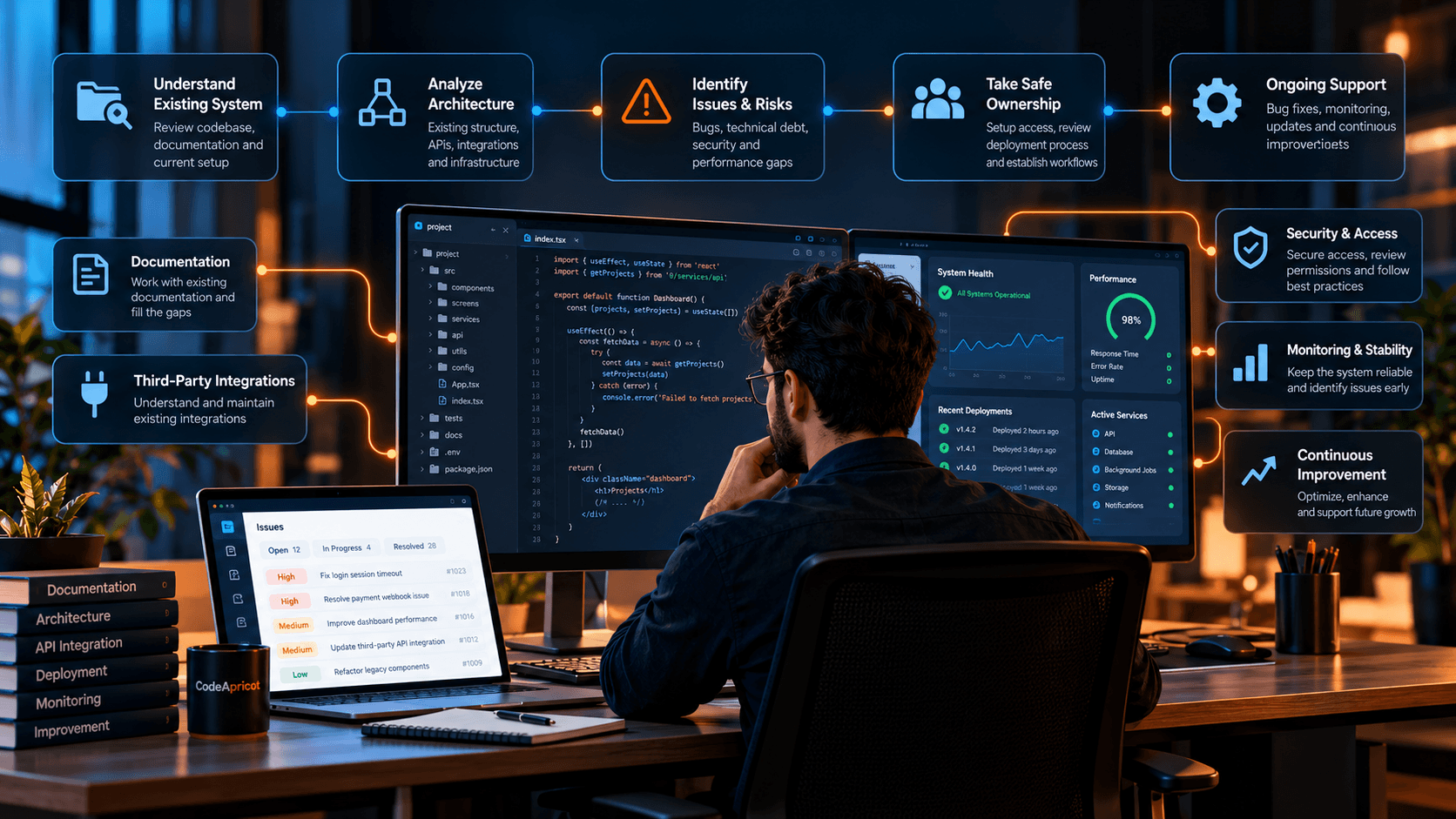
The goal is to understand the existing system, establish a safe way to maintain it, identify risks, and gradually create the confidence needed for ongoing development.
Why Taking Over Existing Software Requires a Different Approach
When a team inherits an existing application, there is usually a history behind the code.
The system may contain:
- Existing business rules
- Third-party integrations
- Custom workflows
- Legacy components
- Technical debt
- Infrastructure dependencies
- Deployment processes
- Database structures
- Undocumented decisions
Some of this information may be documented. Some may only be understood by people who previously worked on the project.
The first responsibility of a new team is therefore to understand what already exists before making significant changes.
Understanding the Existing System
The first stage of taking over a software project is building a clear picture of the current system.
This usually involves reviewing:
- Source code
- Project structure
- Documentation
- Database architecture
- APIs
- Authentication
- Third-party services
- Hosting and infrastructure
- Deployment configuration
- Monitoring and logging
- Existing tests
The objective is not to understand every line of code immediately.
It is to understand how the major parts of the system connect and where the important business and technical dependencies exist.
Reviewing the Architecture
An existing application may contain several interconnected systems.
For example:
Frontend → API → Backend → Database
with additional connections to:
Payments → Notifications → Storage → Analytics → External Services
Understanding these relationships is important before changing any part of the system.
A seemingly small modification can sometimes affect another part of the application if the dependencies are not understood.
Architecture review helps identify those relationships before development work begins.
Finding Documentation Gaps
Documentation can make a major difference when transferring ownership of a software system.
Useful documentation may include:
- Development setup
- Environment variables
- Deployment process
- API documentation
- Database information
- Third-party integrations
- Authentication flows
- Business workflows
- Infrastructure configuration
- Monitoring procedures
In reality, existing documentation may be incomplete or outdated.
That does not necessarily prevent a team from taking over the system, but it does mean part of the transition may involve rebuilding missing knowledge.
As the new team learns the system, documenting important discoveries can reduce future dependency on individual developers.
Understanding Existing Integrations
Third-party integrations are often some of the most important parts of an existing application.
A system may depend on:
- Payment providers
- Email services
- SMS platforms
- Cloud storage
- Maps
- Authentication services
- Analytics
- Notification platforms
- External APIs
A support team needs to understand not only which integrations exist, but also how the application uses them.
For example, it can be important to know:
- Which services are production-critical
- Where credentials are managed
- Which APIs are called
- What happens when an external service fails
- Which workflows depend on the integration
This knowledge helps reduce the risk of breaking an important business process during maintenance.
Identifying Technical Risks
Once the system has been reviewed, the next step is to identify areas that may require attention.
Potential risks can include:
- Outdated dependencies
- Weak test coverage
- Undocumented infrastructure
- Fragile integrations
- Performance problems
- Security concerns
- Database issues
- Difficult deployment processes
- Accumulated technical debt
Not every issue needs to be fixed immediately.
A useful approach is to separate urgent risks from improvements that can be addressed gradually.
For example:
Immediate: A production issue affecting customers.
High priority: A security or reliability concern.
Planned: Technical debt that makes future development harder.
Long term: Architectural improvements that are valuable but not immediately required.
This creates a more manageable path for improving the system.
Taking Ownership Safely
Before making significant changes, the new team should establish a reliable development and deployment workflow.
This can include:
- Confirming repository access
- Understanding environments
- Reviewing deployment procedures
- Setting up local development
- Establishing access to required services
- Understanding backups
- Reviewing monitoring
- Confirming rollback procedures
The goal is to make sure the team can make changes without creating unnecessary operational risk.
A safe transition is not about changing everything quickly. It is about establishing enough understanding and control to make changes confidently.
Testing Software You Did Not Build
Testing becomes particularly important when a team is unfamiliar with the codebase.
Existing automated tests may provide useful protection, but they may also be incomplete.
Testing can include:
- Existing automated tests
- Regression testing
- API testing
- Integration testing
- Manual functional testing
- Critical workflow testing
- Production smoke testing
The most important workflows should be understood and tested before major changes are introduced.
For example, if a business depends on customer registration, payments, document uploads, or order processing, those workflows should receive appropriate attention during maintenance.
Managing Bugs and Technical Debt
Supporting existing software usually involves two different types of work.
The first is responding to problems that affect users or business operations.
The second is improving the underlying system so that future development becomes easier and more reliable.
Bug fixes may include:
- Investigating production issues
- Reproducing problems
- Identifying root causes
- Implementing fixes
- Testing changes
- Deploying safely
- Monitoring the result
Technical debt may involve:
- Refactoring difficult components
- Updating dependencies
- Improving architecture
- Increasing test coverage
- Improving documentation
- Simplifying complex code
Both matter, but they should be prioritized according to business impact and technical risk.
Security and Access
Taking over an existing system is also an opportunity to review who has access to the application and its supporting infrastructure.
This can include:
- Repository access
- Production access
- Cloud infrastructure
- Databases
- Third-party services
- API credentials
- Deployment systems
- Administrative accounts
Access should be reviewed and managed according to the responsibilities of the people and teams involved.
The transition can also reveal credentials, permissions, or configuration practices that need to be improved.
Monitoring and Stability
Once a team takes responsibility for an existing system, monitoring becomes an important part of ongoing support.
Useful signals may include:
- Application errors
- API failures
- Performance
- Infrastructure health
- Failed background jobs
- Payment failures
- Notification failures
- Database problems
Monitoring can help the team identify issues before they become larger operational problems.
It also provides useful information when investigating incidents after they occur.
Continuous Improvement After the Transition
Taking over a software system is not only about maintaining what already exists.
Once the team understands the application, there may be opportunities to improve it.
These improvements might include:
- Better user experiences
- Faster workflows
- Improved performance
- Better integrations
- New functionality
- Simplified architecture
- Improved reporting
- Better automation
The key is to improve the system progressively rather than attempting a complete rewrite without a clear business reason.
When Should a Business Consider External Software Support?
External support can be useful when a business has an important software system but does not have enough internal technical capacity to maintain it.
Common situations include:
- The original development team is no longer available
- The business has inherited an application
- Internal developers need additional support
- The application requires ongoing maintenance
- Technical issues are becoming difficult to manage
- The business needs help with integrations
- The product requires continuous improvements
- The business wants a reliable technical team without building a larger internal team
The right support model depends on the complexity of the system, the business requirements, and the level of internal technical ownership available.
What a Good Software Handover Should Achieve
A successful handover should leave the new team with a clear understanding of the system and a practical way to maintain it.
Ideally, the team should know:
- How the application works
- How it is deployed
- Which systems it depends on
- Where important data is stored
- Which workflows are business-critical
- How users access the system
- How problems are monitored
- How changes can be tested safely
The goal is not to know everything immediately.
It is to establish enough understanding to operate the system safely and continue improving it.
Supporting Software for the Long Term
Once ownership has been established, software support becomes an ongoing process.
A healthy maintenance approach combines:
- Monitoring
- Bug resolution
- Security updates
- Dependency maintenance
- Testing
- Performance improvements
- Documentation
- Technical improvements
- New feature development
This allows the software to continue evolving as the business changes.
A system that was built several years ago does not necessarily need to be replaced simply because it is no longer new. With the right assessment and maintenance approach, existing software can often continue to provide value while being improved over time.
Building Confidence in an Existing Software System
Taking over software built by another team requires patience and a structured approach.
The first step is understanding the system.
Then comes identifying risks, establishing safe development and deployment practices, improving documentation, and gradually addressing the issues that matter most.
From there, the focus can shift from simply maintaining the existing product to improving it around the business's current and future requirements.
At CodeApricot, we approach software support by first understanding the existing system, its business workflows, integrations, and technical foundation before making changes.
Our Support & Continuous Improvement solutions are designed to help businesses maintain, improve, and evolve software as their needs change.
Ready to Take Control of Your Existing Software?
If your business depends on software built by another team and you need help understanding, maintaining, or improving it, start a project with CodeApricot.
Stay Updated
Receive practical insights, engineering perspectives, and business-focused technology articles delivered as new content becomes available.
Looking For Guidance On Your Next Project?
Whether you're exploring new technology, planning a digital product, or solving a business challenge, we'd be happy to discuss your goals and help you identify the right approach.